-1.png?width=400&name=DWRLogoClassic%20-%20Copy%20(2)-1.png "DWRLogoClassic - Copy (2)-1")
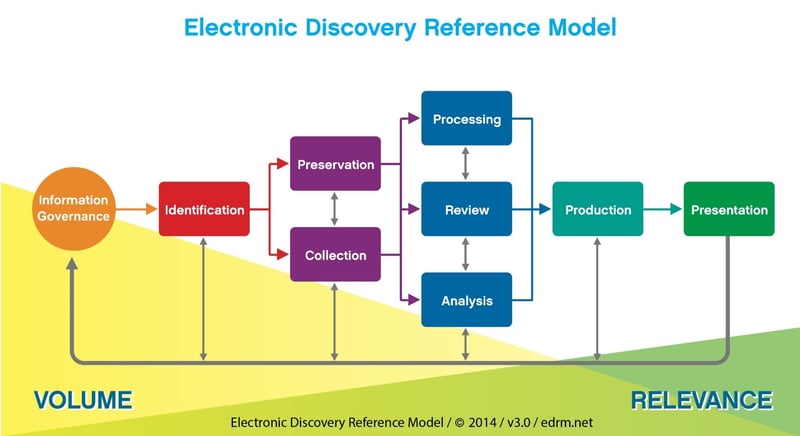
Digital WarRoom follows the general workflow of the EDRM, an industry standard method of conducting eDiscovery. www.edrm.net
Creating and managing a matter
Matter / Database – in eDiscovery, every matter is associated with a database containing all documents relating to that matter. In this way, the words matter and database are interchangeable.
Archive – a copy of your data meant to be stored for possible access in the future. File organization is crucial in understanding and revisiting your inactive data after a long period of time.
Backup – An exact copy your data. Digital WarRoom automatically keeps backups of all your files in case of data loss.
Views – Represent stages of your eDiscovery workflow in Digital WarRoom, in DWR we define them as Processing, Policy, Review, Draft Productions, Productions and Reports. You can toggle between views to access tools designed for the different stages of eDiscovery.
Processing
Field/ Metadata/ column – Data that has several parts can be divided into fields. For example: create date, last modified date, author. In a database, each column holds one field. The information in these fields are known as metadata. Metadata describe all possible recorded information about the files.
Process / Catalog documents – The act of adding documents to WarRoom. The tool will extract all metadata from each document which can be used later for filtering
Indexing (automatic) – the act of finding words in documents so you can look them up quickly
Collections vs Imports:
Job – a processing task specific to a computer service. There are 5 common eDiscovery computer services
Exceptions – a variety of errors which prevent documents from processing correctly
The following are the major reasons a submission fails:
Policy
Pith- This identifies near duplicates of emails, such as the copies that were sent and received. The reviewable content for both will be identical (while differing in aspects such as header and formatting), so deduping by pith will save you time.
Forensic fingerprint - This identifies exact duplicates. If the difference between the sent and received copies of the same email may be critical enough that they need to be reviewed separately, for example, use this method.
Dedupe – remove duplicates of documents. By default, DWR dedupes by pith, meaning and email sent from bill and received by Jeremy in a different time zone will return only one document.
Custodian – the original owner or user of a collection of documents
Noise word/stop word – the most common words in a language are filtered out of indexing to make your searches more efficient. These words are excluded because they will not help you narrow your search to find your intended documents. Examples: the, a…
Review
Marks (tags) – Will the document be produced? Each document can have 1 mark. Examples: Privileged, Produce, Not responsive
Issue codes – What legal or factual issue does the document relate to? Each document can have unlimited issue codes. Example: Duty, Breach, Damages
PODS (Protective Order Designation) – Explains the level of confidentiality of the document
Propagate – when your attorney work product (marks, issue codes, PODS) automatically copies across duplicate documents
Filter tree – contains all attributes of your documents of which you can select, filter and narrow your corpus to a particular subset of documents
Attribute – an item in the filter tree for which you can filter documents. Example: binders, custodians, collections, extensions
Families – documents that are grouped together. Example: an email with an attachment
Threads – A thread of emails containing all emails connected to the original email
Redaction – censoring a document for production
Reindexing – indexing your documents again due to changes in the indexable content
In most cases, you won't need to use this function since documents are automatically indexed upon processing. However, there are a few situations where re-indexing makes sense:
Draft Production
Native file – a document that has maintained the same file type as when it was originally collected
Conversion/imaging/printing – converting your native documents to images for the purpose of redacting, endorsing and bates stamping
Endorse – stamp your document with some information prior to production, most commonly a bates number or POD.
Production and Export
Sequencing - all documents in a production are assigned a sequence number. The sequence number determines the order in which documents will be processed and assigned Bates numbers.
When is a good time to resequence my production?
Placeholder/ Slipsheet – a placeholder for a document that has been withheld due to privilege, clawback, etc to avoid a bates gap